Your Laptop Shouldn'tLimit Your Ideas.
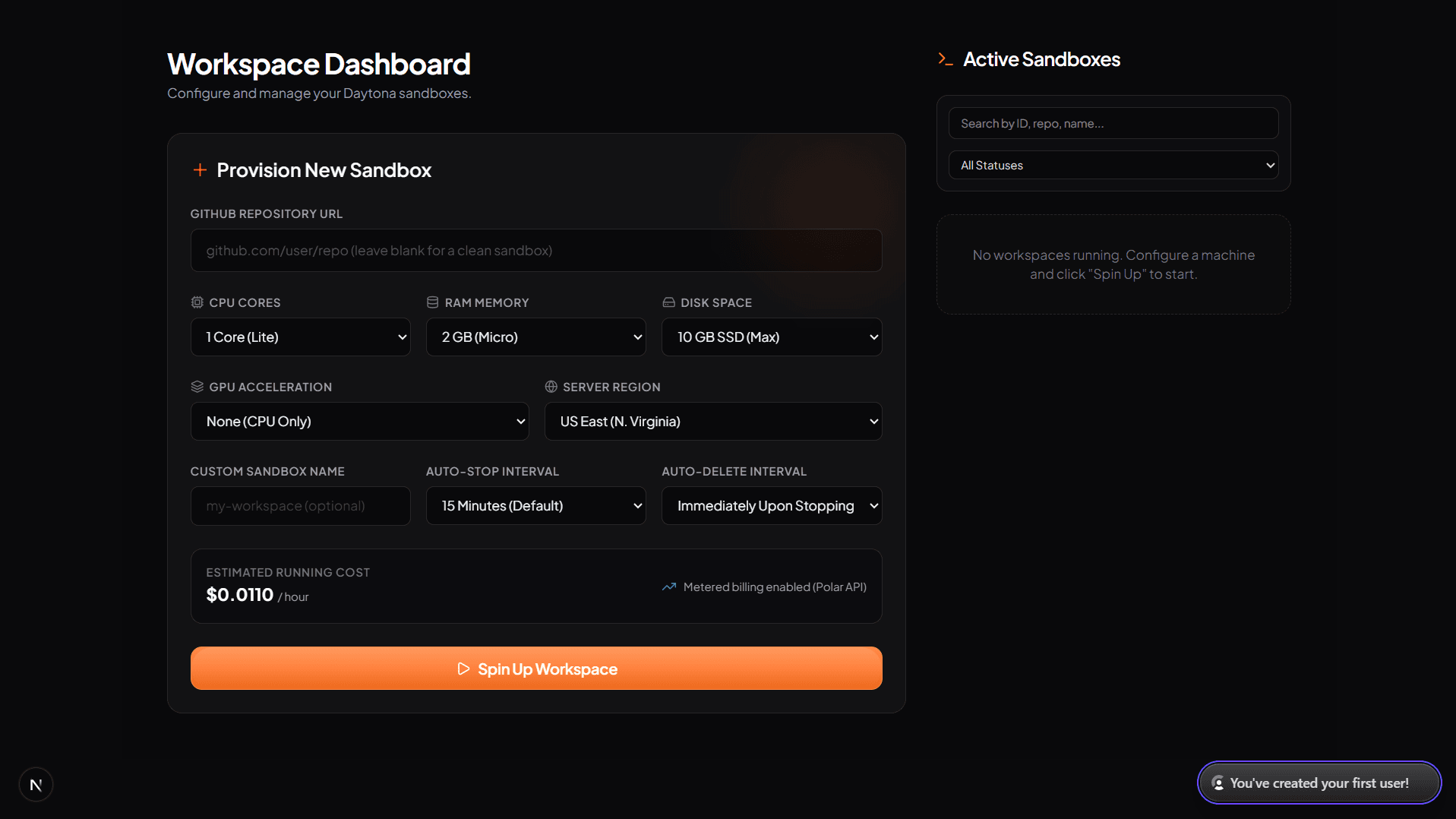
Built for modern, speed-first workloads.
Everything you need for speed and performance, without the local device compromises.
Cloud Workspaces
Browser-based VS Code and JupyterLab environments. Never spend hours configuring toolchains locally again.
Per-second Billing
Pay only when your machine is active. As soon as you stop, billing stops instantly.
GPU On Demand
Tap into Raw CUDA power instantly for AI training or media pipelines. No hardware required.
Runs Anywhere
Works on any modern browser. Develop from a Chromebook, tablet, or a 10-year-old desktop.
Persistent Storage
All files, node modules, configurations, and edits are automatically saved and preserved.
Instant Provisioning
Spin up a complex environment with high vCPU and RAM configurations in under 3 seconds.
Ready to code. Choose your editor in 1 click.
Select between full-featured VS Code or JupyterLab. Clone any repository, customize your compute resources, and start building in under 3 seconds.
VS Code Cloud Workspace
Full-featured Visual Studio Code running directly in your browser. Complete with extension marketplace, language servers, terminal, and live port forwarding.
JupyterLab AI & Data Science
Interactive JupyterLab sandboxes optimized for AI prototyping, data analysis, Python notebooks, and high-performance GPU tensor computations.
Any Git Repository
Paste any public or private GitHub repository URL. Velocity automatically clones your codebase, configures your branch, and boots your IDE in ~3 seconds.
Root Linux Container
Standard Ubuntu 22.04 LTS environments with root privileges. Install any compiler, package, or toolchain via apt, pip, cargo, and npm without restrictions.
Launch to coding in 3 seconds.
A simple workflow designed for speed. Configure your machine, launch, and code. Stop when you are done.
Choose Editor & Repo
Select VS Code or JupyterLab and paste your Git repository.
Choose Resources
Select the CPU, RAM, and GPU you need.
Launch
Your workspace is provisioned in under 3 seconds.
Build
Develop in your browser with zero setup latency.
Built for developers of all backgrounds.
Whether you are learning to code or deploying large language models, Velocity scales to meet your exact compute requirements.
Students
Learn Docker, mobile development, or PyTorch on a ₹30,000 laptop. Access the same resources as industry professionals without buying a ₹1,50,000 MacBook.
Freelancers
Build client projects and run resource-intensive builds without slowing down your computer. Speed up delivery and work from anywhere.
Startups
Onboard new engineers in seconds instead of days. Supply them with standardized, secure, and pre-configured workspace templates instantly.
AI Engineers
Train neural networks and prototype machine learning scripts. Tap into high-performance GPUs on demand and stop when models finish training.
Developers
Isolate experimental environments, build complex microservices, and sandbox packages. Protect your local storage and battery life.
Connect Velocity to the editor your AI already uses.
Plug FairArena MCP into VS Code, Claude, Cursor, and any compatible agent client so it can control cloud workspaces directly from chat.
Add Velocity MCP to VS Code
Use Velocity MCP inside VS Code to create, start, stop, and inspect cloud workspaces without leaving your editor.
code --add-mcp "{\"name\":\"velocity\",\"url\":\"https://velocity.fairarena.app/api/mcp\"}"{
"servers": {
"velocity": {
"url": "https://velocity.fairarena.app/api/mcp"
}
}
}https://r.jina.ai/velocity.fairarena.app
npx skills add https://github.com/Saksham-Goel1107/Velocity-Skills
List active workspaces and machine specs
Create sandboxes with CPU, RAM, disk, GPU, and editor selection
Start, stop, delete, and share workspaces from chat
Fetch preview URLs, terminal access, SSH commands, and analytics
One endpoint
Point every compatible client to the same FairArena MCP URL.
Editor-ready
Structured config blocks are ready to copy into client MCP settings.
Agent-readable
Expose the AI mirror so autonomous agents can understand Velocity first.
Programmatic Cloud Sandboxes in Node.js, Python & Terminal
Spin up remote sandboxes and manage infrastructure dynamically using the official TypeScript SDK, Python SDK, or CLI Tool.
@fairarena/velocity-cloud-sandbox
velocity-cloud-sandbox
npm i -g @fairarena/velocity-cloud-sandbox-cli
import { VelocityCloudSandbox } from '@fairarena/velocity-cloud-sandbox';

// Initialize client with your Velocity API Key (from Dashboard)
const velocity = new VelocityCloudSandbox({
  apiKey: process.env.VELOCITY_API_KEY, // Bearer ak_live_...
});

// 1. Provision a new cloud sandbox container
const sandbox = await velocity.createSandbox({
  repo: 'github.com/Saksham-Goel1107/Velocity',
  cpu: 4,
  memoryGB: 8,
  diskGB: 10,
  gpu: 'rtx5090', // Options: 'none', 'rtx4090', 'rtx5090', 'rtx6000', 'h100', 'h200'
  gpuCount: 1,
  editor: 'code-server', // 'code-server' or 'jupyter'
  customName: 'AI Development Sandbox',
  autoStop: 15, // Auto-stop after 15m idle
  autoDelete: 0,
});

console.log(`Sandbox ID: ${sandbox.id} | Status: ${sandbox.status}`);

// 2. Query workspace details
const workspace = await velocity.workspaces.get(sandbox.id);
console.log(workspace);

// 3. Control container state & cleanup
await velocity.workspaces.update(sandbox.id, { action: 'stop' });
await velocity.workspaces.update(sandbox.id, { action: 'start' });
await velocity.workspaces.delete(sandbox.id);
Full Programmatic Lifecycle
Create, query, stop, resume, and delete sandboxes dynamically inside CI/CD pipelines, agent loops, or automated testing environments.
API Key Authentication
Authenticate via standard ak_live_... keys created directly from your Velocity Cloud dashboard.
Control your cloud sandboxes directly from ChatGPT.
Connect the official Velocity GPT to your OpenAI account to provision containers, track wallet balance, manage repo shares, and control infrastructure from chat.
Velocity GPT
OpenAI Custom GPT • OAuth 2.0 Enabled
Use natural language prompts in ChatGPT to launch 1–16 vCPU sandboxes, attach NVIDIA GPUs, monitor wallet spending per second, and manage repository share links without logging into the console.
Try asking Velocity GPT:
Instant Container Control
Provision, start, stop, restart, and delete cloud sandboxes directly from ChatGPT conversation.
Real-Time Billing & Wallet
Check wallet balances, view per-second burn rates, and track lifetime usage spend without opening the dashboard.
OAuth 2.0 Security
Single sign-on OAuth 2.0 integration with Clerk authentication and automatic token refresh.
Get Velocity on All Your Devices
Fast, secure, and always in sync. Control and monitor your cloud workspaces seamlessly from your desktop, mobile, or code editor.
Velocity Desktop for Windows
Experience lightning-fast performance right on your PC. Launch, monitor, and manage your cloud development environments directly from your desktop without needing to open a browser.
Velocity Desktop is digitally signed by Velocity Cloud Inc using Authenticode SHA-256 encryption. If Windows SmartScreen displays a prompt on first launch, click More info ➔ Run anyway.
Transparent USD Metered Rates, Pro & Enterprise Tier
Pay strictly per second for compute resources, upgrade to Pro for priority access, or scale your organization with Enterprise security & dedicated support.
Essential developer compute for exploring sandboxes, testing code & building projects.
- Up to 4 vCPU & 8GB RAM per sandbox
- High-speed NVMe SSD persistent storage
- VS Code Server, JupyterLab & Web Terminal
- Community resource pool with automated scaling
- Up to 3 AI assistant messages / hour
- No Live Resource Resizing
- No Real-Time Telemetry & Performance Graphs
- No Direct Terminal SSH Access
- No GPU Acceleration (H100/H200/RTX)
- No Activity Logs Audit Trail
- No Advanced Third-Party App Connectors Via MCP
Designed for power developers needing high performance, instant headroom & live analytics.
- Priority queue admission & higher resource headroom during rush times
- On-Demand Live Resource Resizing (CPU, RAM, NVMe SSD)
- Full Third-Party App Integrations & MCP Connectors (GitHub, Gmail, Slack, Linear, Notion & Many More developer toolkits)
- Real-Time Telemetry & Historical Performance Graphs (CPU/RAM/Disk)
- Direct Terminal SSH Access to sandboxes
- High-Performance GPU Acceleration (H100, H200, RTX 5090)
- Password Protection & Custom Expiration on shared links
- Comprehensive Activity Logs Audit Trail
- 10 AI assistant messages per hour
- Priority and faster developer support
Designed for organizations requiring team multi-tenancy, compliance & enterprise SSO.
- Organization Creation & Multi-Tenant Team RBAC
- Single Sign-On (SSO) via SAML 2.0, OIDC & SCIM User Provisioning
- Dedicated Enterprise Integration Vaults, Custom MCP Proxies & Private Third-Party Connectors
- Custom API Rate Limits, Volume Pricing & Custom Resource Ceilings
- Guaranteed SLA Uptime (99.99%) & Custom Invoicing Terms
- White-Labeling, Custom Domains & Branding, Private/On-Premise Deployment, Dedicated Isolated Compute & Private VPC Peering
- 24x7 Dedicated Enterprise Support & Solutions Architect
Live Rate Calculator
Pay-As-You-Go Rates
Billed strictly per second for active sandboxes. Stopped containers charge only storage.
Pro Subscription Priority
$29/mo or $313.20/yr. Priority queue admission & live analytics.
Transparent USD Billing
No hidden fees or lock-ins. Real-time balance deductions & invoice history.
Frequently Asked Questions
Stop buying hardware.
Start coding instantly.
Provision any technical workspace in 3 seconds. Pay only while running—per second, no subscriptions.